
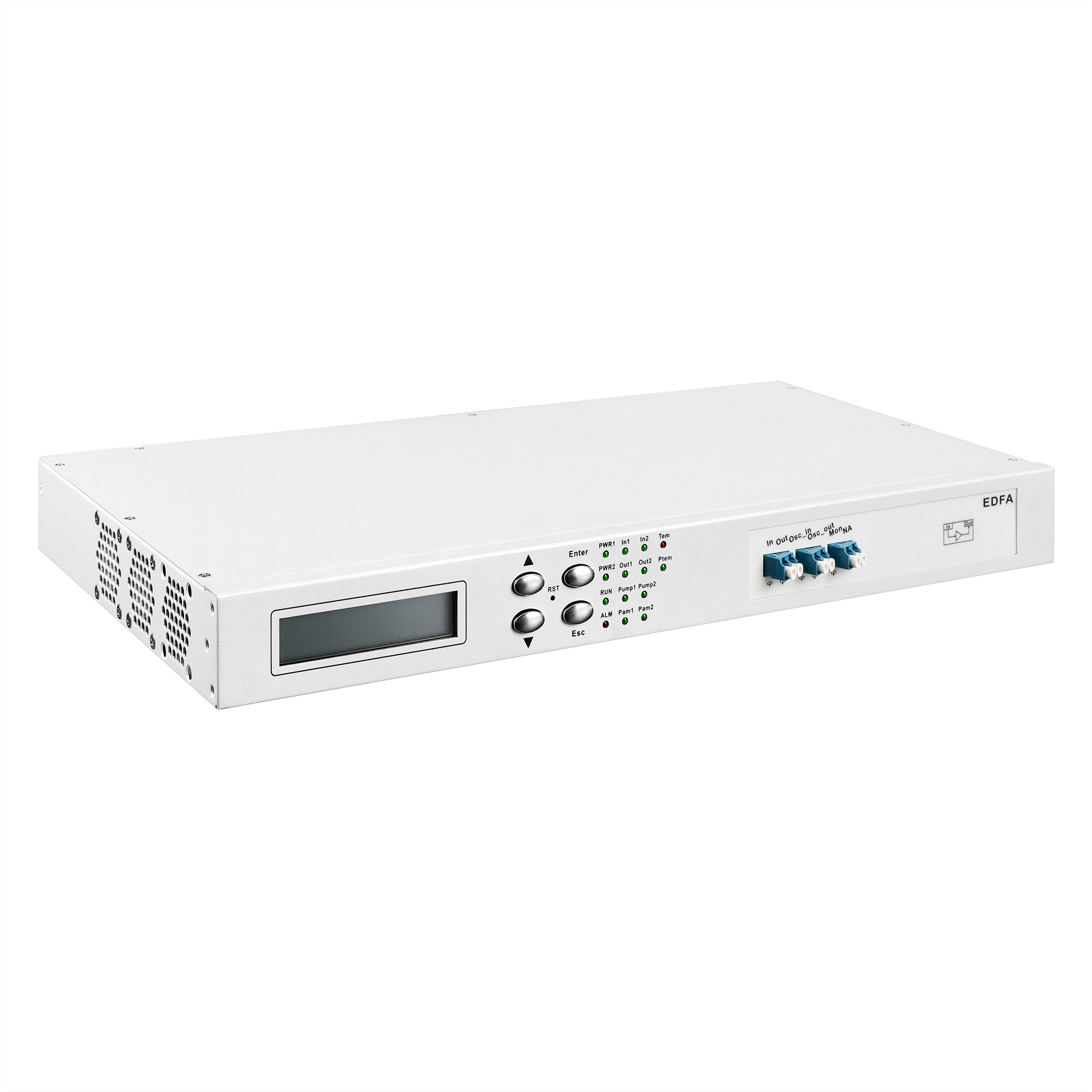
EDFA Rack-Mount / 1U Chassis-Based

The main function of EDFA(Erbium Doped Fiber Amplifier) optical amplification equipment is to compensate the power of signal light in the transmission link, and can simultaneously amplify the optical signals of up to 48 channels (channel interval is 100GHz) or 96 channels (channel interval is 50GHz) in C- band. It has the characteristics of flat gain, adjustable gain and small noise index, it is an indispensable part of DWDM system and future high-speed system, all-optical network long-distance transmission.

Category:

Description

Product Features

Features
Support C- band DWDM system optical amplification
Support optional with OSC signal input amplification function
Support power amplification, line amplification (two optical amplification), pre-amplification
Can monitor: pump drive current, pump output power, pump switch, pump temperature, input optical power, output optical power, module temperature
Support can be set to pump switch, AGC mode and APC mode (input and output optical power adjustable)
Support optical monitoring port (MON)
The use of LCD display, very intuitive display data, user-friendly operation
Application

Amplifier Type Key Characteristics Application
BA Power Amplifier High input power, high gain, high output Used at the transmitting end of DWDM system to improve optical power
LA Line Amplifier Low input power, high gain, high output Used in the middle of two network nodes in DWDM system
PA Preamplifier Low input power, high gain, low output Used for DWDM system terminal to improve received optical power

Product Specifications
Function OBA Power Amplification OPA Power Amplifier
Operating wavelength range Standard type: 1529nm ~ 1561nm
Extended type: 1528nm ~ 1568nm
Minimum input optical power -22dBm -32dBm
Maximum output optical power +20dBm +16dBm
Maximum Gain 17dB 20dB
Noise factor <5.5dB
Gain flatness <1.5dB
Specific technology Support gain lock, gain adjustable, transient control technology, output optical power automatic shutdown
Network Management Function Support real-time monitoring of EDFA working status, including: optical power, pump, temperature, etc.
Support pump off threshold and automatic recovery time setting function
Optical Interface LC/UPC (customizable)
MTBF > 100000 hours

EDFA Device Interface Definition
Interface Label Name Features/Links
In EDFA input interface Small signal optical power input port.
Out EDFA output interface EDFA Amplified Output Optical Port.
OSC_IN Monitoring channel input port Link network management card SFP TX to transmit network management information.
OSC_Out Monitoring channel output Link network management card SFP RX, transmission network management information.
MON Monitoring port EDFA performance monitoring interface, link OPM or spectrometer.

Single Disk Monitoring Information & Device Settings
Category Details
Monitoring Online real-time monitoring of EDFA single disk working status
Monitoring Real-time monitoring of EDFA input optical power, output optical power
Monitoring Real-time monitoring of EDFA Pump working status
Monitoring Real-time monitoring of EDFA working current, power consumption, die temperature, cooling current, etc
Setting Can set the input and output light threshold, EDFA working mode, output power threshold, gain, etc
EDFA Device Settings Details
Setting 1 Input and output power alarm threshold setting
The amplifier input and output power alarm threshold can be set through the network management, when the input power is lower than the threshold, EDFA alarm, at this time EDFA pump is turned off, EDFA does not work, EDFA output below the threshold will prompt alarm
Setting 2 Working mode setting
The amplifier working mode can be set through the network management: AGC constant gain mode, APC constant output mode and ACC constant current mode. The gain can be set in AGC mode with the best setting range of ± 1db. The output power can be set in APC mode with the best setting range of ±1dBm
Setting 3 Setting of eye protection mode
When installing, debugging or dealing with faults, the amplifier eye protection mode can be opened through the network management to reduce the output power of EDFA and avoid harming maintenance personnel
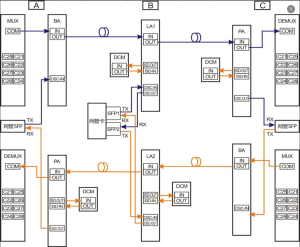
Diagram Connection diagram of works

EDFA Connection Diagram

Description
Description Details
MUX coupler COM port is connected to BA input port IN, BA output port OUT is connected to long-distance optical cable to transmit large signal light, and OSC-in port is connected to network pipe card optical port Tx transmitting port
The network management card SFP TX is connected to the OSC-IN interface of BA OSC channel, and RX is connected to the OSC-OUT interface of PA OSC channel
The OSC channel OSC-IN and OSC-OUT of LA1 are respectively connected to Rx of SFP1 and Tx of SFP2 of network pipe card optical port, and the OSC channel OSC-IN and OSC-OUT are respectively connected to Tx of SFP1 and Rx of SFP2 of network pipe card optical port to realize cascaded bidirectional transmission of network pipe card