
2.5G CWDM SFP Transceiver Supplier: Stock the Right Rate and Wavelength Combination
A distributor can stock the correct CWDM wavelength and still dispatch the wrong spare if the rate is hidden in the item description. When selecting a 2.5G CWDM SFP transceiver supplier, build stock records around the approved rate, channel, reach category and host application together. Feiyi’s 1.25G/2.5G CWDM SFP family supplies the relevant product starting point for lower-rate optical equipment. First separate the 2.5G ordering rows from the 1.25G rows, then confirm the exact wavelength and receiving limits for each customer configuration.
This matters for wholesalers supporting installed networks rather than buying one complete new system. A shared family name can conceal several distinct modules. Keeping those distinctions in the stock description helps an operator dispatch a qualified spare without turning every urgent replacement into a new engineering investigation.
Build 2.5G CWDM SFP stock from the two actual ordering rows
Feiyi lists XKSC-XX24-40BD at 2.5G, with a 40 km distance entry, CWDM 1270–1610 nm, DFB/PIN and LC/PC. XKSC-XX24-80BD is listed at 2.5G, 80 km, CWDM 1470–1610 nm, DFB/APD and LC/PC. The 40 km row has a DDM Y/N field; the 80 km row lists DDM Y. Confirm the configured wavelength and diagnostic choice for the actual supplied unit.
Those are two starting groups for a stock plan, not proof that every wavelength in each range is presently available. Nor do the distance categories supply the optical limits of the selected module. Before approving a stock code, request the version-specific specification and connect it to the customer equipment and channel it can serve.
The 120 km CWDM row belongs to 1.25G
The same family table includes XKSC-XX12-C0BD at 1.25G with a 120 km entry. It should not be promoted as a 2.5G 120 km module. A buyer searching for the longest reach in the family needs to preserve the data-rate column before comparing distance. A wider family introduction cannot override the rate on that specific row.
A distributor maintaining both 1.25G and 2.5G circuits should therefore keep separate approval records even when a wavelength or connector is shared. If a customer requests a 2.5G reach not established by the listed rows, obtain a configured technical confirmation rather than converting the 1.25G entry into a new product claim.
| Stock group | Published row boundary | Keep visible in the inventory record |
|---|---|---|
| 2.5G, 40 km category | 1270–1610 nm; DFB/PIN; DDM Y/N | Selected wavelength and diagnostic option |
| 2.5G, 80 km category | 1470–1610 nm; DFB/APD; DDM Y | Configured optical limits and receiving application |
| 1.25G, 120 km category | A separate 1.25G row | Rate restriction; exclude from unqualified 2.5G substitution |
A 2.5G CWDM SFP transceiver supplier should help define qualified substitutions
The family description names operation from 155 Mb/s to 4.25 Gb/s, SFP MSA and SFF-8472. Those statements describe the family scope. They do not establish that one configured module operates every rate automatically in every customer host. A stock substitution should identify the accepted service rate and the exact host application.
Retain the SFP host and +3.3 V interface requirement
The product lists a single +3.3 V supply and a duplex LC receptacle. Verify those interface requirements with the customer’s equipment approval. A module that physically enters a cage is not fully qualified merely because its optical light reaches the far end. Recognition by the host and operation of the required service need their own evidence.
Consider a reseller serving an industrial equipment maker and a network-maintenance company. Both may ask for a 2.5G CWDM SFP, yet their host software, service mode and case conditions may differ. Keep the approved host application with each customer configuration. Avoid a universal equivalence label that turns one successful customer sample into a compatibility promise for both.
Commercial and industrial versions need separate configuration identity
Feiyi lists commercial case temperature from 0 to +70°C and an industrial option from −40 to +85°C. Select the version against the module’s installed case conditions and the host requirement. An outdoor equipment description alone does not establish the temperature at the optic inside its enclosure.
If the distributor stocks an industrial version as a proposed substitute for a commercial version, confirm the relevant optical and host characteristics for that supplied configuration. Do not assume the temperature label is the only distinction. The approved document should identify the version that receiving staff and installers will actually handle.
Organize CWDM channels around customer filter maps
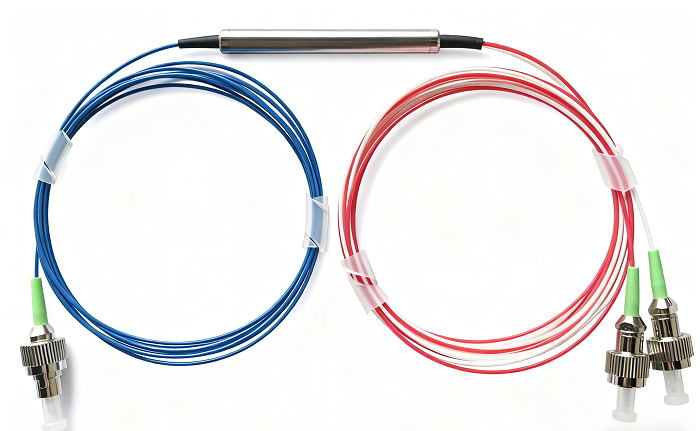
Feiyi’s 3-port CWDM device offers a passive route for a selected wavelength and the remaining reflected light. A customer’s installed filter map determines which module channel can traverse that route. “CWDM SFP” is too broad for dispatch when several wavelengths are kept on the same shelf.
A maintenance order for one channel should preserve that channel rather than selecting a nearby stocked wavelength. The spare may emit light and operate in the host while being rejected by the installed passive path. Record the customer’s approved center wavelength and filter-port assignment before deciding which stock line can replace it.
For a new OEM assembly using individual three-port filters, tie the module wavelength to the transmission/reflection route on the drawing. The optical budget depends on the path actually taken. The distributor can supply the component family, but should not assume that every assembly using a CWDM label has the same route or loss.
As external engineering context, Cisco’s CWDM module documentation illustrates wavelength-specific module and optical-interface selection. It is background for organizing a channel review, not evidence of Feiyi’s host compatibility, receiver limits or platform support.
Approve reach groups with sensitivity and overload limits
The 40 km and 80 km entries do not publish the full transmitter-output and receiver-input limits required to calculate a customer link. Obtain those limits for each approved configuration. A stock group should identify which documented optical conditions it can serve, rather than treating a greater distance category as a universal upgrade.
For an outside-plant route, evaluate the actual fiber loss at the selected channel, connectors, splices and passive-filter loss. Preserve the agreed reserve. For a short laboratory or local connection, check maximum received power against overload as well as minimum received power against sensitivity. The two cases ask different questions of the same stock description.
A field-service customer may test a spare through a short cord before taking it to a longer installed circuit. Define the permitted bench condition using the configured optical limits. If attenuation is required, retain that arrangement with the test record. A direct bench connection and the installed filtered route should not be treated as the same acceptance condition.
The distinction between the listed DFB/PIN and DFB/APD rows also belongs in the approval. Keep the supplied receiver arrangement associated with its technical limits. Do not describe all units with a combined receiver label that makes the inventory look simpler but loses the information engineering needs.
Make diagnostic options usable to the customer’s equipment
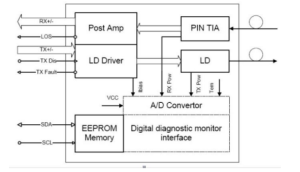
Feiyi describes digital diagnostic monitoring with internal or external calibration. Confirm the calibration option and diagnostic availability for the supplied module, and check how the customer host reads the values. The DDM choice should remain on the stock record, particularly where the 40 km ordering row allows Y/N.
A customer may use diagnostics to compare a replacement with an installed module. That comparison is most useful when the reported readings, calibration treatment and host interface are understood. A diagnostic feature does not replace the approved optical acceptance method or establish that the complete external link has passed.
If a customer’s maintenance procedure expects diagnostics, an otherwise similar non-DDM module is a changed configuration. Identify that change before dispatch rather than leaving the technician to discover it after installation. If the application does not require diagnostics, still retain the delivered option so that later repeat orders remain consistent with the accepted stock line.
When buying several channels together, ask for acceptance evidence that retains each configured wavelength instead of one unqualified family result. The intended passive path and the host application may be shared, but the selected optical channel remains a unit-specific purchasing detail. A receiving record should make that association visible before the modules enter customer stock.
For returns, preserve the dispatched configuration and the customer’s reported host and route. A module returned from an unknown channel path cannot immediately establish a failure of the stocked version. Keeping those details lets the distributor distinguish a misassigned wavelength, a changed service rate or an optical-limit issue from a confirmed component problem.
Separate 2.5G CWDM stock from DWDM and 10G stock
The 1.25G/2.5G DWDM SFP family is relevant to customers using a DWDM passive network. It is not a replacement merely because its rate and SFP format resemble the CWDM module. Channel grid and filter compatibility remain part of the optical approval.
The 10G CWDM SFP+ family belongs to a different rate and host review. A mixed-generation wholesaler can carry all three families, but should preserve distinct approved applications. A shared wavelength does not authorize replacing a lower-rate SFP with a 10G SFP+ in an unqualified host.
Feiyi’s transceiver overview provides background for customers comparing module families. The inventory decision should stay more precise: which configured module restores which customer service, through which installed filter route?
Keep rate and wavelength readable from packing list to dispatch
Request a packing list that distinguishes the selected rate, wavelength, distance row, temperature version and diagnostic option. Match those details to the module labels when receiving the order. Agree protection for the optical interfaces and handling appropriate to the delivered modules; do not assume a specific shipping kit from the family photograph.
For customer-facing stock, use the approved configured description rather than a shortened family name. A clear label should let warehouse staff separate a 1.25G 120 km unit from a 2.5G 80 km unit without relying on memory of part-number fragments. This is particularly useful when several orders arrive with visually similar housings.
Confirm supply and dispatch timing for the actual channel mix. The catalog’s wavelength range does not prove simultaneous inventory of every combination. If the supplier proposes a different configuration, compare it with the customer’s approved record before adding it to the substitution pool.
Stock the combinations your customers can actually use and keep unsupported combinations out of the description. For this family, separating the 2.5G rows from the 1.25G 120 km row is the first useful decision. The next is preserving the selected CWDM channel and host approval so that a fast warehouse dispatch also becomes a correct field replacement.